
What you get
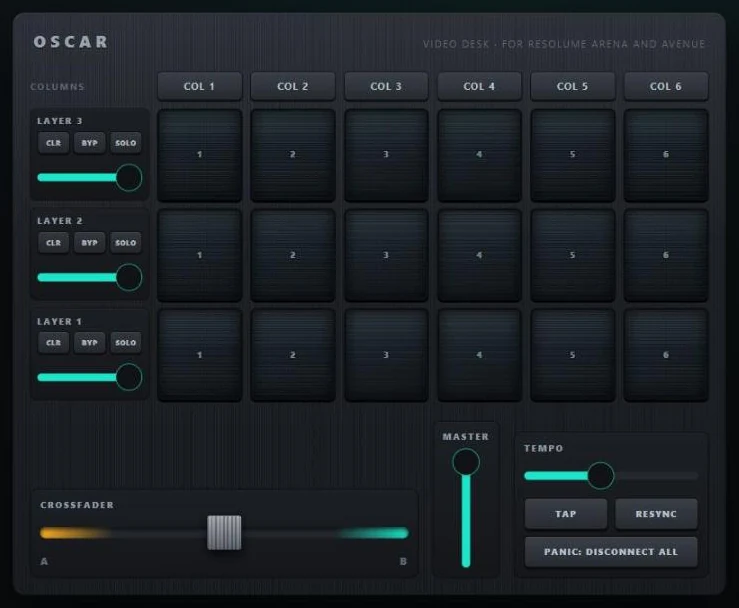
The Resolume Video Desk template is a desk for Arena and Avenue: three layers of six clip keys, a row of column keys, and for each layer its opacity fader, SOLO, BYPASS and CLEAR. Under them the crossfader, the master fader, tempo tap, BPM and resync, and a disconnect-all. Every control already sends to port 7000, Resolume's default; you set the IP once.
You will need
- Resolume Arena or Avenue, on a computer.
- OSCAR, on that computer or on any other on the same network.
- A phone or tablet on that network.
Set up Resolume
- Arena → Preferences → OSC. Turn OSC Input on; the port is 7000.
- For the faders to follow what happens in Resolume, turn OSC Output on as well, with OSCAR's IP as the address and 8880 as the port, OSCAR's listening port. A layer's opacity moved in Resolume then moves on every phone.
- Put clips in layers 1 to 3, columns 1 to 6.
Set up OSCAR
- File → Open project or template → Resolume Video Desk.
- If Resolume is on another computer, select every control and set its Ip to that computer's address. On the same computer,
localhostis already set. - Press Publish, then Publish in the window, and scan the QR code. Hold a clip key: the clip plays while the key is held.
With the OSCAR app
The browser is enough, and there is also a free OSCAR app for Android and for iPhone and iPad. It does two things here:
- With OSCAR. The app finds the OSCAR on your network by itself and opens the desk you published, with no code to scan.
- Standalone. The Resolume Video Desk is built into the app. The phone then sends OSC straight to Resolume on port 7000, with no computer running OSCAR: type the address of the computer running Resolume once, in the header of the Standalone list.
For a tablet left beside an installation, the app's kiosk mode locks it to this one interface.
The addresses
| Control | Address | Notes |
|---|---|---|
| Clip | /composition/layers/L/clips/C/connect | 1 while held. L is the layer, C the column. |
| Column | /composition/columns/C/connect | 1 while held: every clip in the column starts. |
| Opacity | /composition/layers/L/video/opacity | 0 to 1. Follows Resolume with OSC Output on. |
| Solo, bypass, clear | /composition/layers/L/solo /composition/layers/L/bypassed /composition/layers/L/clear | |
| Crossfader, master | /composition/crossfader/phase /composition/master | 0 to 1. |
| Tempo | /composition/tempocontroller/tempotap /composition/tempocontroller/tempo /composition/tempocontroller/resync | |
| Disconnect all | /composition/disconnectall |
Resolume's full list is in its own manual under OSC; any of them goes into a control's Message field.
From the phone, and from anywhere
Every phone that scans the code shows the same desk, and they stay in step. For a visitor on mobile data, OSCAR Pro gives the interface a public link that works from anywhere, with no access to your Wi-Fi.
When nothing moves
Click ACTIVITY in OSCAR's top bar for the network log: every message, with its address and port. If messages go out and Resolume stays still, check OSC Input is on and the port is 7000, and that a firewall on the Resolume computer lets UDP 7000 through.
Questions people ask
Is there a free app to control Resolume from a phone or tablet?
Yes. OSCAR is free and open source, and its Resolume Video Desk puts clips, columns, layer opacity, the crossfader, master and tempo on any phone or tablet, in the browser or in the free OSCAR app for Android, iPhone and iPad.
Does it work with Avenue as well as Arena?
Yes. The desk uses Resolume's own OSC addresses, the same in Arena and Avenue.
Do the faders on the phone follow what I do in Resolume?
Yes, when the desk runs through OSCAR on a computer and Resolume's OSC Output is on, sending to OSCAR's address on port 8880. A layer's opacity moved in Resolume then moves on every phone.
Can a phone control Resolume with no other software on the computer?
Yes, with the OSCAR app: the desk is built in under Standalone, and the phone sends OSC straight to Resolume on port 7000. Resolume only needs OSC Input switched on.
Can I add more layers and columns?
Yes. Open the template in OSCAR's editor and copy a strip: the layer and column numbers are in each control's address.
More guides
TouchDesigner · QLab · DMX lights · MIDI and DAWs · Getting started