
The video loads from YouTube only when you press play.
What you get
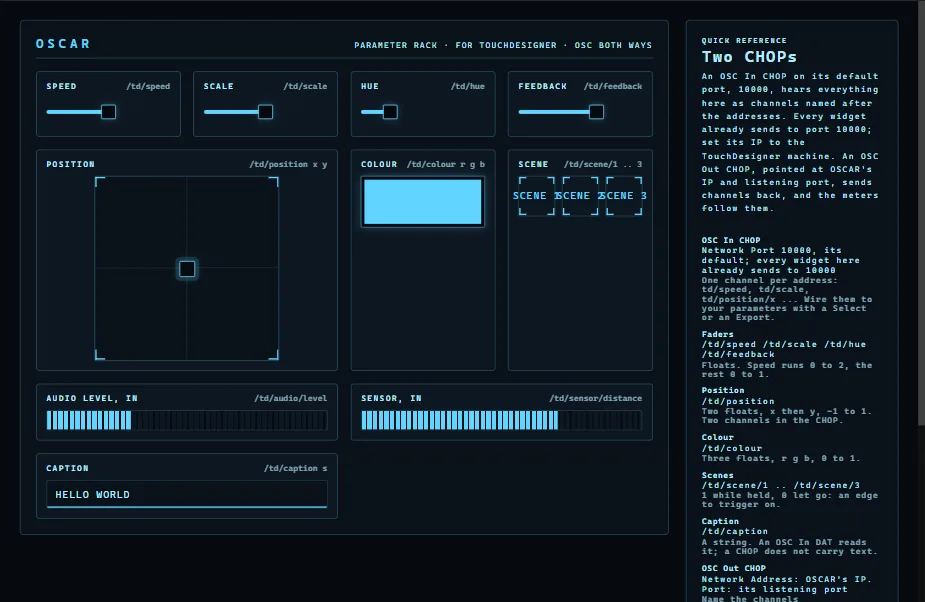
The TouchDesigner Parameter Rack is a template that ships with OSCAR: four faders, an XY pad, a colour picker, a caption you type, three scene keys and two meters that listen back. Every control already sends OSC to port 10000, TouchDesigner's default for an OSC In CHOP, so the whole rack reaches your network through two operators.
You will need
- TouchDesigner, 2022.35320 or newer (the sketches below are written for that build).
- OSCAR, on the TouchDesigner computer or on any other on the same network.
- A phone or tablet on that network.
Set up TouchDesigner: two CHOPs
- Add an OSC In CHOP. Leave Network Port at 10000. Everything the rack sends arrives as channels named after the addresses:
td/speed,td/scale,td/position/x,td/position/y,td/colour/rand so on. - Wire those channels to your parameters with a Select CHOP or an Export, as you would any CHOP.
- To send something back, add an OSC Out CHOP: Network Address is OSCAR's IP, Port is 8880, OSCAR's listening port. Name the channels
td/audio/levelandtd/sensor/distance(0 to 1) and the rack's two meters follow them, on every phone.
OSCAR_IP at the top, and run it.Set up OSCAR
- Open OSCAR and choose File → Open project or template → TouchDesigner Parameter Rack.
- If TouchDesigner is on another computer, select every control and set its Ip to that computer's address; on the same computer,
localhostis already right. - Press Publish, then Publish in the window that opens, and scan the QR code with the phone. Move a fader: the channel moves in the OSC In CHOP.
With the OSCAR app
The browser is enough, and there is also a free OSCAR app for Android and for iPhone and iPad. It does two things here:
- With OSCAR. The app finds the OSCAR on your network by itself and opens the rack you published, with no code to scan.
- Standalone. The Parameter Rack is built into the app. The phone then sends OSC straight to TouchDesigner's OSC In CHOP on port 10000, with OSCAR not running at all: type the address of the TouchDesigner computer once, in the header of the Standalone list.
For a tablet left with the public, the app's kiosk mode locks it to this one interface.
Two sketches to download
Each one uses every control on the rack. Drop the .tox into your network (or File → Import Component); it brings its own OSC In CHOP on port 10000, so the rack drives it as soon as both are on the same network. The .py is the sketch's source: paste it into a Text DAT and run it to build the same thing from scratch, or to read how it is done.
Type Tunnel
The caption you type on your phone flies through a tunnel of its own trails, tiles into a drifting wall, or orbits the point you hold on the pad. Scenes 1 to 3 switch between tunnel, wall and orbit.
Kaleido Feedback
A kaleidoscope of flowing noise centred where you hold the pad, with the caption folded into the mirrors and written plainly in the middle. Scenes 1 to 3 give 3, 6 or 12 mirrors.
Every address on the rack
| Control | Address | What arrives |
|---|---|---|
| Speed, Scale, Hue, Feedback | /td/speed /td/scale /td/hue /td/feedback | One float each. Speed runs 0 to 2, the rest 0 to 1. |
| XY pad | /td/position | Two floats, x then y, −1 to 1: two channels in the CHOP. |
| Colour | /td/colour | Three floats, r g b, 0 to 1. |
| Caption | /td/caption | The text, as typed. |
| Scenes | /td/scene/1 to /td/scene/3 | 1 when pressed; the last one pressed stays. |
| Meters (in) | /td/audio/level /td/sensor/distance | Send 0 to 1 to OSCAR on port 8880 and the meters follow. |
From the phone, and from anywhere
On your own network nothing more is needed: every phone that scans the code gets the rack, and they all show the same state. For a visitor on mobile data, OSCAR Pro gives the interface a public link that works from anywhere, with no access to your Wi-Fi.
When nothing moves
Click ACTIVITY in OSCAR's top bar: the network log shows every message sent, to which address and port. If OSCAR sends and TouchDesigner stays still, check the OSC In CHOP's port and that a firewall on the TouchDesigner computer lets UDP 10000 through.
Questions people ask
Is there a free app to control TouchDesigner from a phone or tablet?
Yes. OSCAR is free and open source, and its Parameter Rack puts faders, an XY pad, a colour picker, a caption and scene keys on any phone or tablet, in the browser or in the free OSCAR app for Android, iPhone and iPad.
Do I need to install anything in TouchDesigner?
No. One OSC In CHOP on port 10000 receives everything the rack sends, as channels named after the addresses. The two sketches on this page bring their own.
Can TouchDesigner send values back to the phone?
Yes. An OSC Out CHOP aimed at OSCAR's address on port 8880 drives the rack's two meters on every phone that has it open.
Can I build my own panel instead of the rack?
Yes. OSCAR's editor runs in the browser: drag in buttons, faders, XY pads and colour pickers, give each an address, and publish. The rack is a template to start from.
Does it work with a visitor's phone at an installation?
Yes. On your network a visitor scans the QR code and the rack opens in the browser, with nothing to install. For a phone on mobile data, OSCAR Pro adds a public link.
More guides
Resolume Arena · QLab · DMX lights · MIDI and DAWs · Getting started